✨ 프로젝트: 용돈 기입장
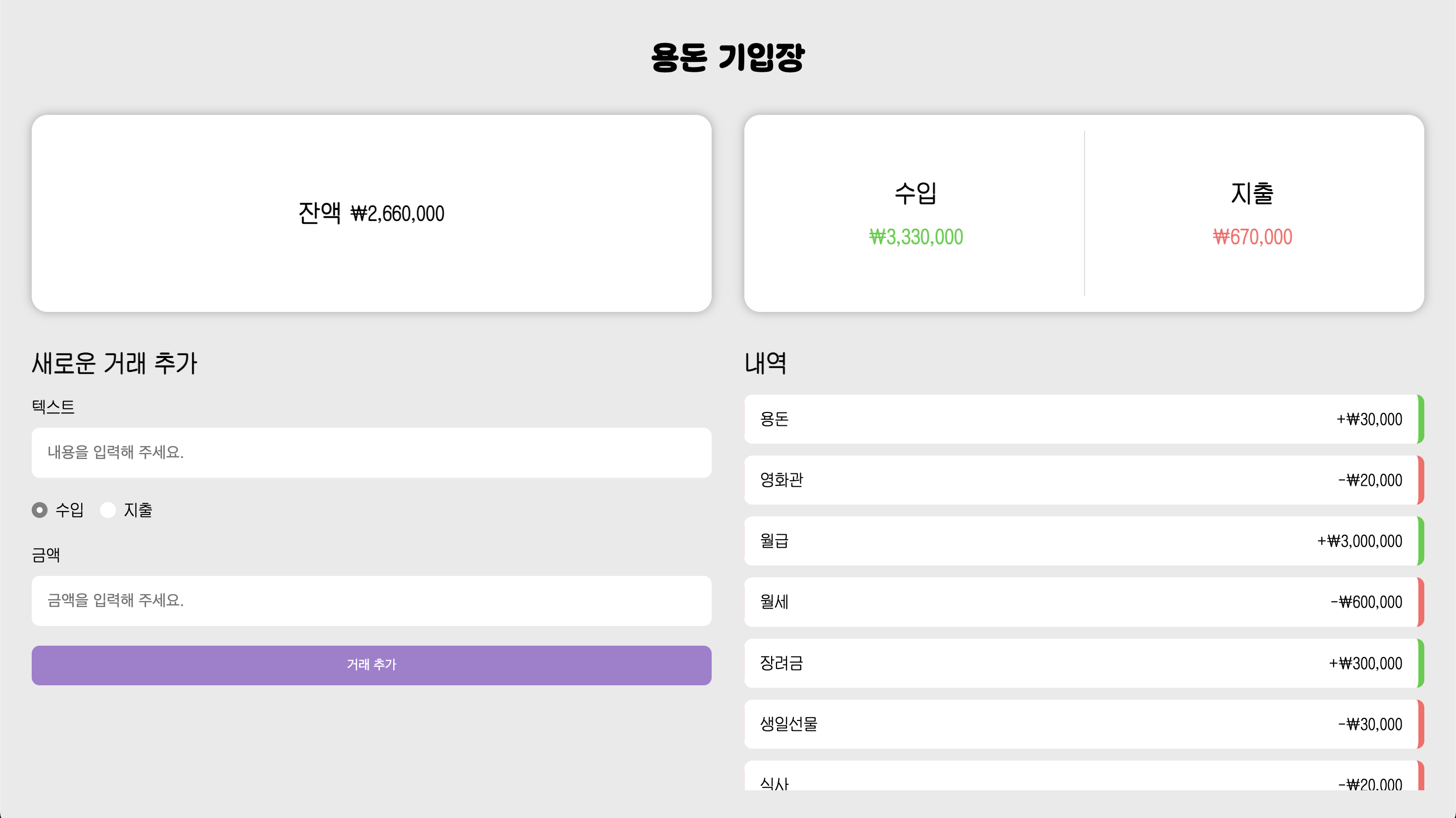
"용돈 기입장"은 간단히 수입과 지출을 관리할 수 있는 React 기반 웹 어플리케이션입니다.
거래 내역 추가, 삭제 기능과 함께 잔액, 총 수입, 총 지출을 한눈에 확인할 수 있습니다.
https://nue-os.github.io/allowance-book/
용돈 기입장
nue-os.github.io
🛠️ 사용 기술
- React v19 (Vite)
- Redux Toolkit (상태 관리)
- CSS Module (스타일 관리)
- localStorage (데이터 저장)
- gp-pages (배포)
👩🏻💻 개발 사항
1️⃣ 거래 내역 입력 폼 구현
텍스트, 금액, 거래 유형(수입/지출) 입력
<div className={css.inputForm}>
    <div className={css.textWrap}>
      <InputField
        label="텍스트"
        id="contents"
        value={trasactionText}
        placeholder="내용을 입력해 주세요."
        onChange={handleContentsChange}
      />
      {errorText && <p className={css.error}>{errorText}</p>}
    </div>

    <div className={css.radioGroup}>
      <RadioButton
        id="income"
        name="type"
        value="income"
        label="수입"
        checked={transactionType === 'income'}
        onChange={handleRadioChange}
      />
      <RadioButton
        id="expense"
        name="type"
        value="expense"
        label="지출"
        checked={transactionType === 'expense'}
        onChange={handleRadioChange}
      />
    </div>
    <div className={css.amountWrap}>
      <InputField
        label="금액"
        id="amount"
        value={transactionAmount}
        placeholder="금액을 입력해 주세요."
        onChange={handleAmountChange}
      />
      {errorAmount && <p className={css.error}>{errorAmount}</p>}
    </div>

    <button className={css.button} onClick={handleSubmit}>
      거래 추가
    </button>
</div>
2️⃣ 금액 입력 포맷팅
금액을 입력할 때 ₩ 기호와 천 단위(,) 표시를 자동으로 표시
const rawValue = e.target.value.replace(/[^0-9]/g, '') // 숫자인지 검증

if (rawValue === '') {
  setTransactionAmount('')
  return
}
const formattedAmount = '₩ ' + Number(rawValue).toLocaleString()
3️⃣ 입력값 검증
내용이나 금액이 비어있을 때 등록이 안 되도록 입력 검증 로직을 추가
let hasError = false;

if (trasactionText === '') {
  setErrorText('내용을 입력해주세요!');
  hasError = true;
} else {
  setErrorText('');
}

if (transactionAmount === '') {
  setErrorAmount('금액을 입력해주세요!');
  hasError = true;
} else {
  setErrorAmount('');
}

if (hasError) return;
4️⃣ 모달 구현
거래를 삭제할 때 실수로 지우는 것을 방지하기 위해 삭제 전 모달 확인 추가
- Modal 컴포넌트를 재사용 가능하도록 구현
// Modal.jsx
const Modal = ({ onClose, children }) => {
  return (
    <div className={css.modal}>
      <div className={css.modalCon}>
        <button className={css.closeBtn} onClick={onClose}>
          X
        </button>
        {children}
      </div>
    </div>
  )
}- 모달 오픈 상태 관리
// TransactionItem.jsx
const [isModalOpen, setIsModalOpen] = useState(false)

const handleModalOpen = () => setIsModalOpen(true)
const handleModalClose = () => setIsModalOpen(false)


// ... 중략
{isModalOpen && (
    <Modal onClose={handleModalClose}>
      <p>삭제하시겠습니까?</p>
      <div className={css.btnWrap}>
        <Button color="white" text="취소" onClick={handleModalClose} />
        <Button color="red" text="확인" onClick={() => handleRemove(id)} />
      </div>
    </Modal>
)}
5️⃣ 데이터 관리
- Redux Toolkit을 사용해서 거래 내역을 전역 상태로 관리
export const transactionsSlice = createSlice({
  name: 'transactions',
  initialState: {
    transactions: JSON.parse(localStorage.getItem('myData')) || [],
  },
  reducers: {
    addTransaction: (state, action) => {
      state.transactions.push(action.payload)
    },
    removeTransaction: (state, action) => {
      state.transactions = state.transactions.filter(
        transaction => transaction.id !== action.payload
      )
    },
  },
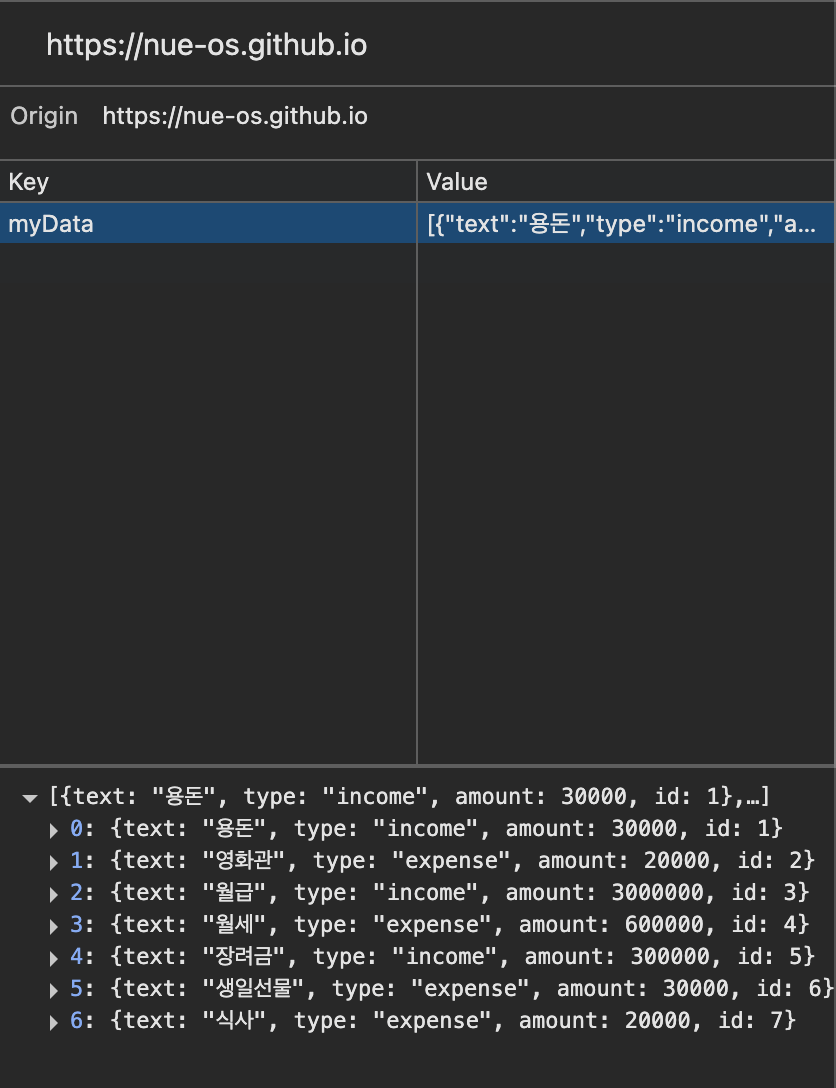
})- LocalStorage에 저장해서 새로고침해도 데이터가 유지되도록 관리
- 거래 추가 시: localStorage와 Redux 둘 다 업데이트
const addItem = useCallback(
    item => {
      try {
        const list = getList()
        const id = list.length > 0 ? list[list.length - 1].id + 1 : 1
        const newItem = { ...item, id }
        const newList = [...list, newItem]
        localStorage.setItem(key, JSON.stringify(newList))
        dispatch(addTransaction(newItem))
      } catch (err) {
        console.log('[error] ', err)
      }
    },
    [key, getList]
)- 거래 삭제 시: localStorage와 Redux 둘 다 삭제
const removeItem = useCallback(
    id => {
      try {
        const list = getList()

        const filterdList = list.filter(item => item.id !== id)
        localStorage.setItem(key, JSON.stringify(filterdList))
        dispatch(removeTransaction(id))
      } catch (err) {
        console.log('[error] ', err)
      }
    },
    [key, getList]
)
6️⃣ 금액 합계 계산 기능
총 잔액, 수입, 지출 계산
// 총 수입
export const calIncome = transactions =>
  transactions.filter(t => t.type === 'income').reduce((acc, t) => acc + t.amount, 0)

// 총 지출
export const calExpense = transactions =>
  transactions.filter(t => t.type === 'expense').reduce((acc, t) => acc + t.amount, 0)

// 총 잔액
export const calBalance = transactions => calIncome(transactions) - calExpense(transactions)
7️⃣ 공통 Button 컴포넌트
모달이나 폼 제출 버튼처럼 여러 곳에서 버튼을 사용해야 하기에 버튼 컴포넌트 분리
- color prop을 받아서 버튼 색상 스타일을 다르게 적용
const Button = ({ color = 'primary', text, onClick }) => {
  const buttonClass = `${css.button} ${css[color]}`;
  return (
    <button className={buttonClass} onClick={onClick}>
      {text}
    </button>
  );
};
🪄 완성 코드
https://github.com/nue-os/allowance-book
GitHub - nue-os/allowance-book: 용돈 기입장
용돈 기입장. Contribute to nue-os/allowance-book development by creating an account on GitHub.
github.com
728x90
반응형
'LG 유플러스 유레카 SW > React' 카테고리의 다른 글
| [#64] TanStack Query(React Query) 사용해보기 (0) | 2025.04.29 |
|---|---|
| [#63] 날씨 오픈 API 연동 (1) | 2025.04.28 |
| [#61] Redux란 (1) | 2025.04.24 |
| [#60] React - Hook + 성능 최적화 정리 (0) | 2025.04.23 |
| [#59] React 쇼핑몰 - Shop 페이지 상품 필터링/정렬 + 페이지네이션 (0) | 2025.04.22 |